Dashboard
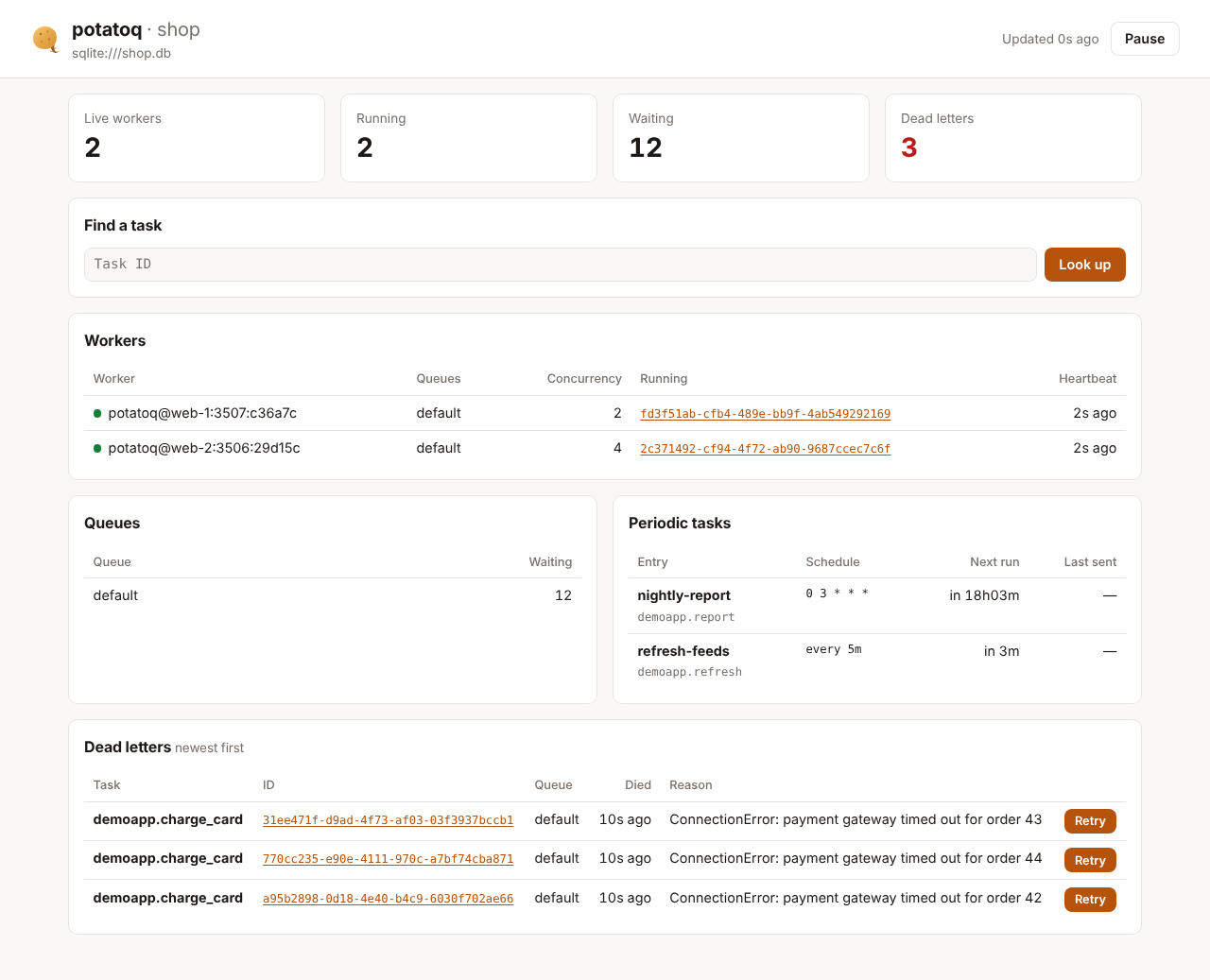
A web page with what Flower shows you most: live workers and what they're running,
queue sizes, periodic tasks and when they run next, dead letters you can replay, and the
details of any task by ID. It's part of pip install potatoq, with no extra
dependencies, and works with every broker.
Run it
| Option | Default | |
|---|---|---|
--host |
127.0.0.1 |
Address to listen on. Use 0.0.0.0 (with --auth) to reach it from other machines |
--port |
5555 |
Flower's port, so existing bookmarks and firewall rules keep working |
--auth user:password |
off | HTTP basic auth. POTATOQ_DASHBOARD_AUTH keeps the password out of ps |
--read-only |
off | Hide the retry and revoke buttons, and refuse those requests |
The page refreshes every 3 seconds. It reads the same data as potatoq status, queues,
schedule and dead list, straight from the broker, so it works as soon as it starts
and shows the same thing on every machine. It needs no worker of its own and no events.
Protect it
The dashboard shows task arguments and can replay and revoke tasks. It listens on
localhost unless you pass --host, and warns when you listen elsewhere without
--auth. Behind a reverse proxy, put it under your usual login instead.
Mount it in your web app
The dashboard is a WSGI app (Dashboard(app)) with an ASGI version (.asgi), so it can
live under a path of the app you already run and use its login.
Only staff users get in (is_staff, like the Django admin); everyone else is sent
to LOGIN_URL. Set POTATOQ_DASHBOARD_READ_ONLY = True to hide the actions.
from potatoq.dashboard import Dashboard

fastapi_app.mount("/ops/potatoq", Dashboard(potatoq_app).asgi)
Add your own authentication in front of the mount, for example a middleware that checks the session for that path.
Dashboard(app, read_only=True, auth=("user", "password")) takes the same options as
the command. Leave auth out when your framework already guards the path.
What it shows
- Summary: live workers, running tasks, waiting tasks and dead letters.
- Workers: each live worker's queues, processes × threads, the IDs of the tasks it's running right now, and how long ago its heartbeat arrived (amber when it's late).
- Queues: tasks waiting in each queue, including ones scheduled for later (on RabbitMQ, those wait in the delay queues and aren't counted until they're due).
- Periodic tasks: every
beat_scheduleentry, when it runs next, and when it was last sent (not on RabbitMQ, which keeps no record of sent runs). - Dead letters: the newest 100, with the reason. Retry sends one back to its
queue, like
potatoq dead retry. - A task by ID: its state, arguments, timings, worker, and its result or traceback. A task that hasn't started yet can be revoked. Click any task ID on the page to open it.
The JSON API
The page reads a small JSON API under the dashboard's path. Use it for scripts and health checks:
| Request | Returns |
|---|---|
GET api/overview |
workers, queue sizes, dead-letter count, periodic tasks |
GET api/dead?limit=100 |
dead letters, newest first, with arguments and reason |
GET api/tasks/<id> |
what the result backend and the queue know about a task |
POST api/dead/<id>/retry |
replay a dead letter |
POST api/tasks/<id>/revoke |
revoke a task that hasn't started |
The POST requests need an X-Potatoq-Dashboard: 1 header. Browsers can't send it from
another site without CORS, which is what protects the actions from cross-site requests.
Compared with Flower
Flower builds its view from Celery's event stream, so it needs events turned on (-E),
and it only knows what happened while it was running. The potatoq dashboard reads the
broker and the result backend, so there is nothing to enable and nothing is lost when it
restarts.
What it doesn't have yet:
- A history of every task with search and filters. Without an event stream there's no list of everything that ran; look a task up by ID instead.
- Charts of throughput and runtimes. Prometheus metrics are planned for that.
- Worker control (shutting workers down, resizing pools, rate limits). Use your
process manager and
SIGTERM/SIGHUP.